

How Graivy fits
into your
restaurants
A guide for the people who’d roll it out: operations, IT, finance, marketing, legal and the stores themselves.
See a demo
 In your restaurant
Where each product
works in a store
From the speaker post to head office.
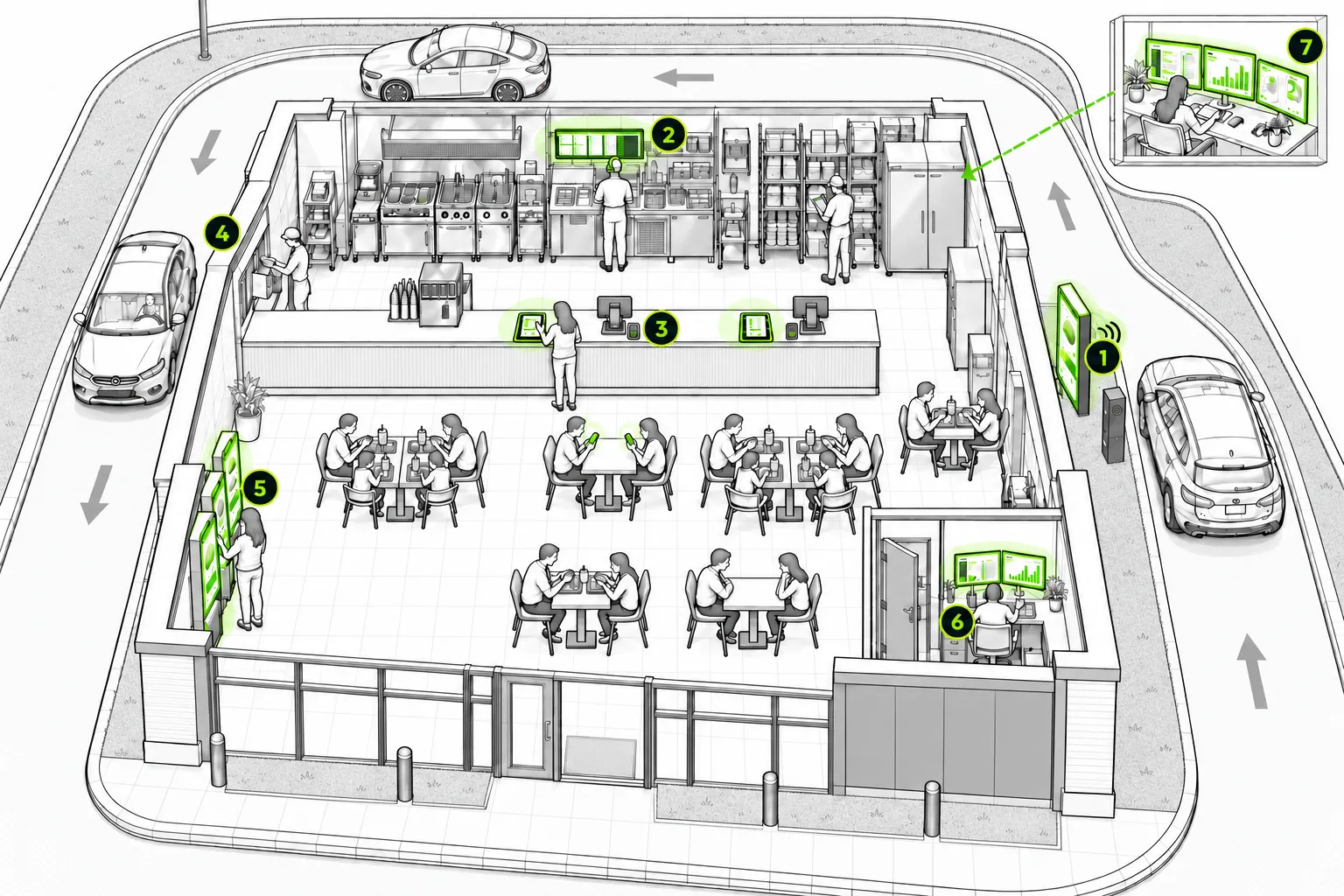
Speaker. ServThru takes the order by voice. Drive-Thru Analyzer scores the conversation afterwards, whether a person or AI took the order.
Crew headsets. The crew hears orders live, as they do today, and steps in when ServThru calls for help.
POS and kitchen. Orders from ServThru and KioskOS land in your POS as they’re confirmed, with nothing to key in.
Pickup window. Your crew takes payment and hands out the meal.
Kiosks. KioskOS runs self-ordering and offers the one add-on most likely to be accepted.
Office. Managers pull up the conversations behind each score, with the key lines highlighted.
Head office. Compare stores and shifts in Drive-Thru Analyzer, and publish kiosk menus with local changes in KioskOS.
 Your systems
Connects to your POS, payments and loyalty
Drive-thru and kiosk orders run on one Graivy platform and land in your POS, which still sets the menu, prices and tax. Graivy connects to the POS, payment and loyalty providers chains already use, including Genius and Revel POS and HME Nexeo Pro.
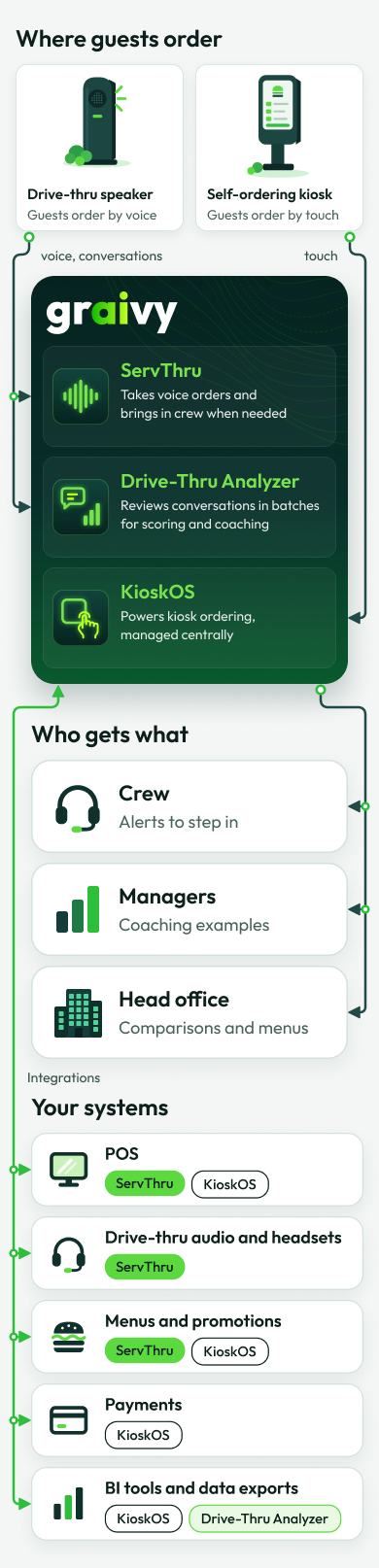
Using something else? Tell us what, and we’ll show you how it would connect.
 Your teams
What each team gets
Operations
COO, VP of operations, district managers
The same peak hour in every store, and a clear view of where each one slips, by shift and time of day.
Ask us about
How the crew steps in, and how stores are compared.
Franchisees and store managers
The people who run each store
Crews spend the rush on the food and the window, not on taking orders. Coaching starts from what was actually said.
Ask us about
Crew training, and what changes on the first day.
IT
CIO, CTO, IT and security teams
Store-by-store rollouts with one-click undo, signed kiosk updates, and kiosks that keep serving when the network drops. Past scores never change, so results can be audited.
Ask us about
Your network, your security review, and what runs in the store versus in the cloud.
Finance
CFO and finance teams
Approved offers made the same way, whoever is working. Kiosk tests your analysts can check in KioskOS dashboards or your own reporting tools.
Ask us about
Pricing, and a business case built on your own numbers.
Marketing and brand
CMO, brand and menu teams
Promotions and limited-time offers stay in sync at the speaker, and kiosk screens carry your brand.
Ask us about
How promotions reach the speaker and the kiosks.
Legal and privacy
General counsel, privacy and compliance teams
The AI never receives a guest’s identity or contact details, and it doesn’t identify anyone by voice. Recordings and logs follow your data policy and local law. Our solutions meet accessibility standards.
Ask us about
What is stored, where, for how long, and how guests are told.
 Getting started
From the first stores to every store
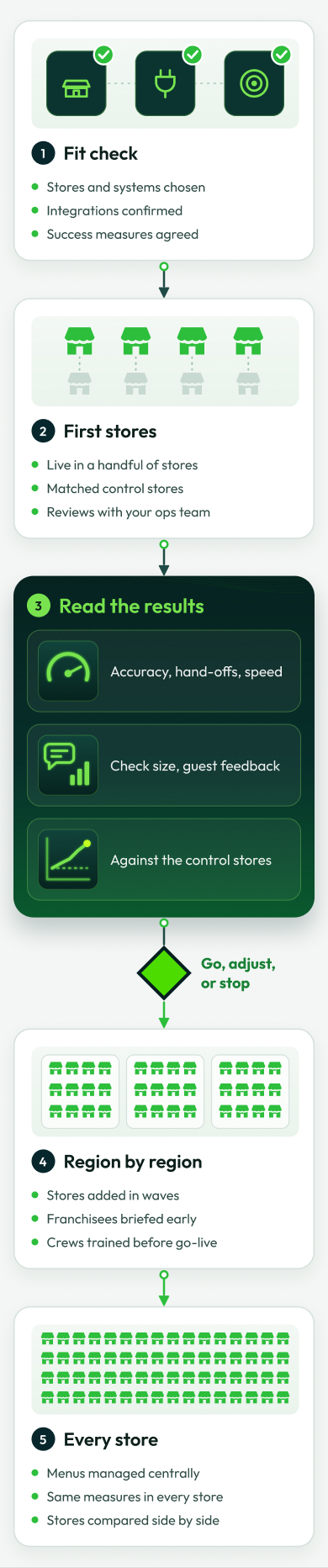
Start in a few stores and compare them with similar stores that don’t have it. Then roll out region by region. You decide at each step whether to go, adjust or stop.

Start with a few stores
Tell us which stores you’d start with, and we’ll show you how the first steps would work.
See a demo